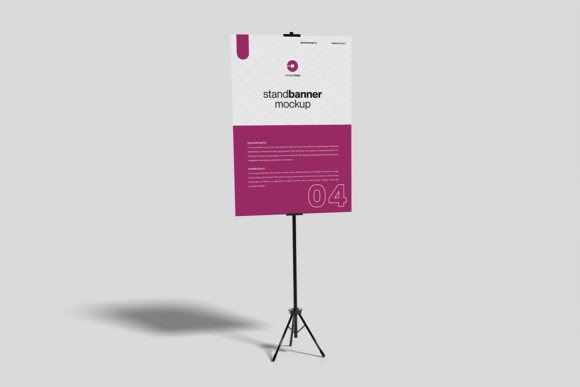
Stand Banner Mockup: A Designer's Tool for Realistic 3D Displays
In the world of design and marketing, presentation is everything. You can have a brilliant concept for a trade show banner, a retail display, or a conference backdrop, but showing it to a client or stakeholder as a flat, lifeless file often fails to capture its true impact. This is where a high-quality mockup becomes an indispensable part of your creative toolkit. The Stand Banner Mockup is specifically built for this purpose, offering a photorealistic 3D environment to showcase your designs with context and professionalism. It’s not a font or a typeface, but a crucial design asset that bridges the gap between your digital canvas and the real world.
Visual Appeal and Professional Character
The core value of this mockup lies in its realistic visual personality. It presents a banner stand within a controlled, three-dimensional setting, allowing viewers to immediately understand scale, texture, and placement. The style is clean, modern, and versatile, avoiding overly specific environmental distractions that might clash with your design. Whether your banner is for a corporate event, a boutique product launch, or an art exhibition, the mockup provides a neutral yet professional stage. This realism directly influences brand perception. When a client sees their logo and messaging on a lifelike banner, it feels tangible and credible, strengthening their confidence in the design and the investment.
Practicality is built into its DNA. The Stand Banner Mockup is delivered in PSD Photoshop format, leveraging smart-object features. This means the process of integrating your artwork is streamlined and efficient. Instead of manually adjusting perspectives, shadows, and highlights, you simply double-click the smart object layer, place your design, save, and the mockup automatically applies all the realistic lighting and surface effects. This saves valuable time during the design iteration and client approval process, allowing you to focus on the creative work rather than technical presentation hurdles.
Strategic Applications Across Projects
This tool’s utility spans a wide range of professional and personal projects. For entrepreneurs and small business owners, it’s perfect for visualizing signage for a pop-up shop, a farmers' market stall, or a lobby display. Marketers can use it to present event collateral, ensuring all visual elements align before printing. Graphic designers and brand strategists will find it essential for client presentations, providing a clear, compelling vision of the final product. Even bloggers and content creators can use it to create professional-looking promotional images for courses, merchandise, or event announcements, elevating their social media graphics beyond simple flat designs.
The mockup’s influence extends to visual hierarchy and audience engagement. By seeing your design in a 3D context, you can better evaluate how typography, logos, and imagery will interact with the physical structure. Does the headline remain legible from a distance? Do the colors pop under realistic lighting? Does the overall composition guide the viewer’s eye effectively? This level of evaluation is difficult to achieve on a flat screen. It helps ensure your design isn’t just beautiful, but also functional and impactful in its intended environment, contributing to a stronger and more recognizable brand identity.
Practical Guidance for Effective Use
Choosing to use a mockup like this is about matching the tool to the project’s needs. If your goal is to sell a vision or secure approval, a photorealistic presentation is far more persuasive than a simple PDF. When evaluating the fit, consider the mockup’s style. The Stand Banner Mockup offers a changeable background color, allowing you to adapt the environment to complement your design’s palette—whether you need a crisp white studio, a dark dramatic backdrop, or a color that matches brand guidelines.
While the mockup itself isn’t a premium font, its application is similar in principle to selecting other design assets. You should test it with your specific artwork. Does your display font or serif font maintain its intended impact when wrapped onto the banner surface? How does your font pairing between a script font for a tagline and a sans serif font for body text hold up in the mockup’s lighting? The 3000x2000 px size at 300 dpi provides ample resolution for both digital presentations and high-quality print proofs, ensuring your mockups are versatile for various outputs.
Remember, the included help file is a valuable resource for getting started quickly. And while the preview photos are for illustration only, the actual mockup file gives you complete control over the final appearance. This asset is a practical solution for anyone involved in editorial design, packaging design, or web design who needs to present physical or large-format digital displays convincingly. By incorporating the Stand Banner Mockup into your workflow, you add a layer of professionalism that can streamline communication, enhance client satisfaction, and ultimately lead to more polished, real-world results.